60 Lovely Fashion Social Media Templates for Your Brand
Let's be honest: maintaining a vibrant, cohesive, and engaging social media presence is a full-time job in itself. For fashion brands, designers, influencers, and boutique owners, the visual standard is even higher. You need a constant stream of fresh, on-brand content that stops the scroll and tells your story. The 60 Lovely Fashion Social Media Templates package is designed directly into this reality, offering a substantial toolkit to transform your Instagram grid, Pinterest boards, and Facebook posts from a daily struggle into a streamlined, creative process.
What You're Actually Getting: A Visual Deep Dive
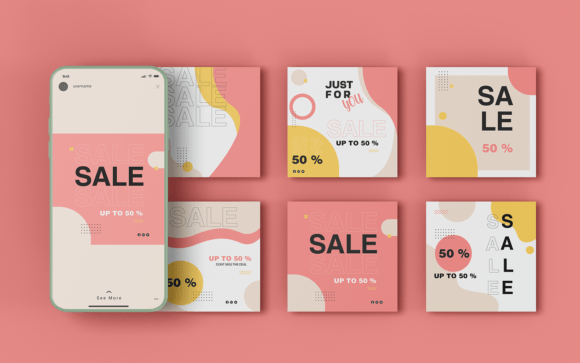
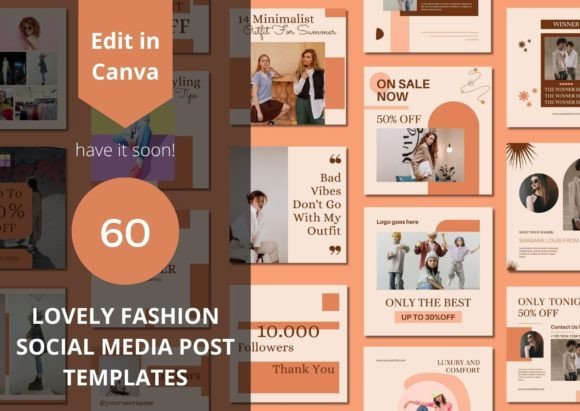
This isn't just a random collection of boxes with placeholder text. The "60 Lovely Fashion Social Media Templates" refer to a curated set of Canva designs with a distinct, modern aesthetic. Think clean lines, generous white space, and elegant typography that feels current but not overly trendy. The personality is sophisticated yet accessible—perfect for brands that want to project professionalism without feeling cold or corporate. The visual style often balances minimalist layouts with strategic use of fashion-forward imagery placeholders, creating a natural hierarchy that guides the viewer's eye from the stunning product shot to the compelling call-to-action.
The overall appeal lies in this balance. These templates serve as a robust starting point, a foundation of good design principles that you can then infuse with your unique brand voice. They respect the principles of modern typography and visual hierarchy, ensuring that even with your own photos and copy, the final output looks polished and intentional.
Practical Applications: From Feed to Stories and Beyond
The true value of these design assets is in their versatility. Here’s how they fit into real-world workflows:
- Product Launches & Advertising: Use templates designed for showcasing new arrivals. They provide a structured frame for your hero product images, making your advertising graphics on Instagram or Facebook look consistent and professional. This consistency builds brand recognition over time.
- Content Creation for Engagement: Not every post is a hard sell. Templates for quotes, questions, styling tips, or behind-the-scenes glimpses help you mix up your content mix. This variety is crucial for increasing engagement and traffic, as it caters to different audience interests and keeps your profile dynamic.
- Brand Identity Reinforcement: By using a cohesive set of templates, you inadvertently reinforce your brand identity with every post. The recurring color palette, font pairings, and layout structures become part of your visual language, making your content instantly recognizable in a crowded feed.
- Time-Saving for Teams: For small businesses or creators wearing many hats, these templates are a lifeline. Instead of designing from scratch daily, you can quickly swap out images and text in Canva (free or Pro), maintaining a high-quality output without the burnout.
They are particularly effective for Instagram post grids, where a cohesive look is paramount, but their adaptable nature makes them suitable for Pinterest pins, Facebook ads, or even quick website banner updates.
Making Them Your Own: Editing and Customization
A key feature of the 60 Lovely Fashion Social Media Templates is their full editability in Canva. This is critical. You are not locked into a rigid design. You can (and should) modify the templates to suit your personal style and needs. This includes:
- Swapping Fonts: While the templates come with suggested font pairings, you can easily change them to your brand's specific typefaces. This is where understanding font pairing basics helps—ensuring your headline font (maybe a display font or serif font) complements your body text (a clean sans serif font).
- Adjusting Colors: Instantly apply your brand's hex codes to backgrounds, text, and graphic elements. This single step is often enough to make a template feel entirely yours.
- Uploading Your Assets: Drag and drop your own product photography, logos, and custom graphics. The templates are built with placeholder frames to make this process intuitive.
- Tweaking Layouts: Move elements around. Resize text boxes. Change the alignment. The goal is to use the template as a starting point, not a final constraint. Think of it as a professional scaffold for your own creativity.
The delivery via a PDF with direct links is a simple, user-friendly method. It ensures you get access to the exact Canva template files without confusion.
Strategic Guidance for Choosing and Using Templates
Before diving in, a little strategy goes a long way. Not every template will be the right fit for every post. Here’s a practical approach:
Evaluate Project Fit: Look at the template's mood. Does its visual personality align with your brand? A template with bold, graphic elements might suit an edgy streetwear label, while a softer, more minimalist layout could be ideal for a sustainable linen brand. Match the template's inherent style to your message.
Test Font Pairings: If you change the fonts, test how they look together. A good rule of thumb is to pair a more expressive script font or handwritten font for headlines with a highly legible sans serif font for body copy. Ensure the combination maintains readability at the small sizes common on mobile devices.
Consider Readability: Always prioritize clarity. If you overlay text on a busy photograph, ensure there's enough contrast—perhaps by adding a subtle semi-transparent shape behind the text. The template's structure should guide you here, but it's your responsibility to ensure the final text is easy to read.
Think About Commercial Use: Since these are design assets for your business, it's wise to confirm the licensing allows for commercial use in your final designs (which standard Canva template licenses typically do, for the end product you create). This protects your investment and your brand identity.
Ultimately, the 60 Lovely Fashion Social Media Templates are a powerful tool for efficiency and consistency. They solve the "blank page" problem, provide a professional foundation, and free you up to focus on what truly matters: creating great products and connecting with your audience. By editing them thoughtfully, you turn a helpful resource into a seamless extension of your unique creative vision.